All-in-One Marketing Project Management Tools for Better Results

  • Manage campaigns, tasks, and teams in one platform.
  • Improve collaboration and communication.
  • Track deadlines and deliverables easily.
  • Project reporting & resource scheduling.
Start Your Free Trial

No Credit Card Required, Cancel Anytime
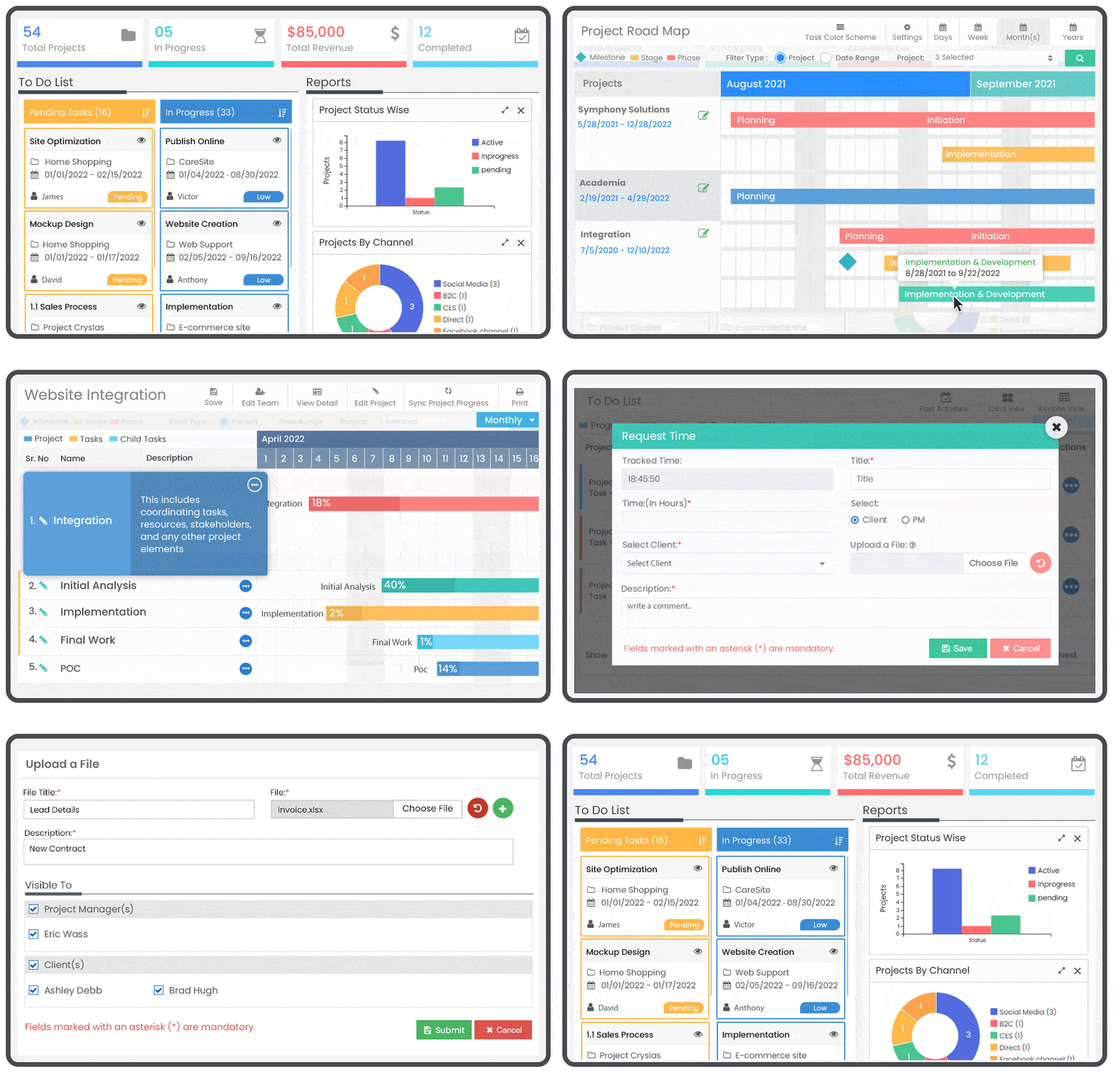
Talygen Marketing Project Management Dashboard

Fragmented Tools Are Fracturing Your Marketing Output

When briefs live in email, tasks are tracked in spreadsheets, creative is reviewed via Slack, and reporting happens in a separate dashboard, campaigns fall apart between the cracks. Marketing project management tools exist to unify this chaos.

Too Many Tools, Not Enough Clarity

Marketing teams using 5+ disconnected tools spend more time context-switching than creating. Critical information gets lost between platforms.

Slow Creative Review & Approval

Email-based creative reviews create long revision cycles, version confusion, and launch delays that erode campaign effectiveness.

No Single Source of Campaign Truth

When stakeholders have different versions of the project plan, every update triggers a new round of alignment — wasting everyone's time.

Reporting Is Always Last-Minute

Without integrated reporting tools, campaign performance updates are manual, delayed, and often inaccurate — frustrating leadership and clients alike.

Marketing Project Management Tools That Cover Every Campaign Phase

From brief intake to post-campaign analysis, Talygen keeps marketing projects on track end to end.

01

Project Templates for Campaign Types

Create reusable project templates for your most common campaign types — content, paid media, social, email. Launch new campaigns in minutes by cloning the template and assigning your team.

02

Task Boards &Campaign Planning

Manage production tasks on Kanban boards and plan campaign timelines using Gantt charts. Set task owners, due dates, and dependencies for complete campaign visibility.

03

File Sharing & Team Collaboration

Upload campaign assets, briefs, and creative files directly to project tasks. Team members can access, review, and provide feedback on shared files within the platform.

04

Campaign Timeline & Milestone Tracking

Map the full campaign lifecycle on a Gantt timeline with milestones, dependencies, and launch date visibility for every stakeholder.

05

Team Workload & Resource Scheduling

Use Talygen’s resource scheduling module to see how work is distributed across your marketing team. Rebalance assignments when someone is overloaded so no deadline falls through.

06

Project Reporting

Generate detailed project status and progress reports. Share with leadership or clients to keep everyone aligned without manual effort.

Start Your Free Trial

From Chaos to Campaign in 4 Steps

Marketing teams using Talygen go from scattered tools to organized campaigns in hours.

01
Create Campaign Templates

Build reusable project templates for your most common campaign types — product launches, email series, social campaigns, content sprints, or paid media pushes. Each template includes pre-configured task lists, approval stages, milestone markers, and timeline structures. When a new campaign kicks off, clone the template and customize the details. Your team skips repetitive setup work and jumps straight into execution with a proven framework already in place.

Create Campaign Workspace
02
Assign Roles & Permissions

Add your entire marketing organization to the platform — content strategists, graphic designers, social media managers, paid media specialists, copywriters, and external stakeholders. Configure role-based permissions so each person accesses only the tasks, assets, and reports relevant to their function. Stakeholders and clients get read-only dashboards for visibility without cluttering the working environment. Clear role definition prevents confusion and keeps accountability sharp across every campaign.

Build Your Team
03
Plan Content & Creative Tasks

Decompose each campaign into specific, actionable tasks with designated owners, deadlines, priority levels, and attached briefs or reference files. Map tasks onto the editorial calendar so the team sees how individual deliverables fit into the broader content schedule. Set dependencies between tasks — design can't start until copy is approved, social posts wait for final creative — so the workflow moves forward automatically without manual handoffs or status-check meetings.

Plan Tasks and Timelines
04
Review, Approve & Analyze

Route creative assets through a structured in-platform approval workflow where reviewers provide feedback, request revisions, or approve with full version history preserved. Track campaign progress against milestones and budget in real time as the launch date approaches. After launch, generate automated performance reports — covering timeline adherence, budget utilization, and campaign results — and share them with leadership or clients directly from the platform with a single click.

Collaborate Approve and Launch
45%
Faster campaign delivery
Reduction in approval cycle time
60%
Less time in status update meetings
90%
Of campaigns launched on budget

Trusted by Marketing Leaders

★★★★★
"Our marketing team runs 20 concurrent campaigns. Before Talygen, we used four different tools and still dropped the ball regularly. Now everything lives in one place. Deadlines are met, approvals are faster, and my team actually enjoys planning instead of dreading it."

Megan Flores

VP of Marketing

★★★★★
"The campaign timeline view alone sold us. Being able to see every campaign, every task, and every dependency on one screen changed how we operate. We cut our missed deadline rate from 30% to under 5% in the first quarter."

Tyler Cunningham

Marketing Director

Run Marketing Projects Like a Seasoned Pro

Thousands of marketing teams use Talygen to launch campaigns faster, collaborate smarter, and deliver results on budget. Start your free trial today.

Start Your Free Trial Schedule a Demo

No Credit Card Required, Cancel Anytime